Web Crawler: User Documentation
What does the Web Crawler do?
The Web Crawler allows the user to extract data from a set of hyperlinked
HTML pages, convert them into OEM format, and load the result into a Lore
database. It takes as input a specification file,
a user profile, and a set
of templates. The specification file describes how the user wants the
extraction to be performed (e.g. where to start, how far to get to, what
pages to include, what templates to use for each set of pages, etc.). The
user profile gives the location of tools needed by the Crawler (e.g.
the Extraction script, and the Lore database loader), while the set of
templates declaratively states where the data of interest could be located
in the target HTML pages.
The Web Crawler makes use of the Web Extractor script (proxygen.py)
written by Arturo Crespo and Junghoo Cho to perform individual extractions.
There is a related perl script lwp-rget (included in perl 5 distribution)
which downloads a web subgraph and adjusts links for off-line browsing.
The perl script provides some interesting features such as a sleep parameter
to stretch out document retrievals, but it does not support the main features
of the Web Crawler such as filtering by document types, extracting document
contents, and converting the extracted information into database objects.
A Sample Specification File
The following is a sample specification file which can be used to gather
the structure of our DB Seminar site. Suppose that we want to extract a
different set of information for the abstracts of the talks, and have designed
a set of special templates for them. For other pages, we will use another
set of templates.
Please note that the line numbers in this example are not part of the
specification file. They are added only to aid the explanation.
-
START
-
http://www-db.stanford.edu/~kyau/dbseminar/seminar.html
-
-
DEPTH
-
2
-
-
INCLUDE_PREFIXES
-
http://www-db.stanford.edu/
-
ftp
-
-
INCLUDE_TEXT_TYPES
-
text/html
-
text/plain
-
-
INCLUDE_BINARY_TYPES
-
image/gif
-
image/jpeg
-
-
INCLUDE_TEXT_SUFFIXES
-
.txt
-
-
INCLUDE_BINARY_SUFFIXES
-
.gif
-
.jpg
-
-
SAVE_TEXT_SRC
-
true
-
-
SAVE_BINARY_SRC
-
true
-
-
SAVE_BINARIES_IN
-
images
-
-
TEMPLATES
-
regular1 template/regular.py
-
regular2 template/regularNolink.py
-
abstract1 template/abstract.py
-
abstract2 template/abstractNolink.py
-
-
DOCUMENT_MAPS
-
http://www-db.stanford.edu/~kyau/dbseminar/abstract/*
abstract1 abstract2
-
http://www-db.stanford.edu/*.html
regular1 regular2
-
* *
-
-
LORE_DB_NAME
-
test
-
-
LORE_ENTRY_TAG
-
dbseminar
-
-
USE_CACHE_WITHIN_DAYS
-
0.5
This specification file consists of fifteen different sections separated
by blank lines. Six of them are required (START, DEPTH,
INCLUDE_PREFIXES, INCLUDE_TEXT_TYPES, TEMPLATES, DOCUMENT_MAPS).
Each section is started with a keyword which states the purpose of the
section.
| Keyword |
Example |
Purpose |
| START |
lines 1-2 |
The URL of the starting page |
| DEPTH |
lines 4-5 |
The crawling depth |
| INCLUDE_PREFIXES |
lines 7-9 |
Types of pages to include. Only URLs starting
with the given prefixes will be extracted. |
| INCLUDE_TEXT_TYPES |
lines 12-13 |
MIME types of text files to include.
Valid only for documents originating from HTTP servers. |
| INCLUDE_BINARY_TYPES* |
lines 15-17 |
MIME types of binary files to
include. Valid only for documents originating from
HTTP servers. |
| INCLUDE_TEXT_SUFFIXES* |
lines 19-20 |
Types of text files to include. Only
URLs ending with the given suffixes will be extracted and treated as text
documents. Valid for documents originating from non-HTTP servers. |
| INCLUDE_BINARY_SUFFIXES* |
lines 22-24 |
Types of binary files to include.
Only URLs ending with the given suffixes will be extracted and treated
as binary documents. Valid for documents originating from non-HTTP servers. |
| SAVE_TEXT_SRC* |
lines 26-27 |
Whether to save the HTML source of accepted
text documents as part of the resultant OEM object. |
| SAVE_BINARY_SRC* |
lines 29-30 |
Whether to download the accepted binary files.
If true, the resultant OEM object will include references to local copies
of the accepted files. If false, only the URLs will be included and no
local copies will be saved. |
| SAVE_BINARIES_IN* |
lines 32-33 |
The directory to save the local copies of
accepted binary files. |
| TEMPLATES |
lines 35-39 |
Set of templates available. Each of the following
lines gives a mnemonic name of a template and the location of the template
file. |
| DOCUMENT_MAPS |
lines 41-44 |
Mapping of groups of documents to list of
templates. Each of the following lines lists a group and the associated
templates. A single wildcard symbol '*' can be used in specifying
a group name. After the Crawler consults the inclusion list and determines
that a page should be extracted, the Crawler will try to match the page's
URL with the groups one by one. When there is a match, the Crawler will
then try to extract the given page with the list of templates associated
with the group, until the extraction is successful. If all the templates
in the group fails, the Crawler will then try to match the URL with another
group, and repeat the above process.
Line 27 shows a 'catch-all' group which will try all
templates on all documents.
NOTE: only text files will be subject to extraction.
All binary files will be saved without any modification. |
| LORE_DB_NAME* |
lines 46-47 |
Name of the Lore database to load the result
of the extraction.
If this field is omitted, the result of the extraction
will be stored in a file without loading into a Lore database. |
| LORE_ENTRY_TAG* |
lines 49-50 |
The persistent Symbolic Object Identifier
to be used to identify the root of the resultant OEM object in a Lore database. |
| USE_CACHE_WITHIN_DAYS* |
lines 52-53 |
Specify how old cached copies can still be
considered as valid. The Crawler will try to use a cached copy if it was
retrieved from the source within the given number of days. Setting this
field to 0 will disable the use of the cache.
If this field is omitted, the Crawler will get the header
of each requested page, and compare the last-modified time of the page
with the cached copy. The cached copy will be used only when the actual
page has not been modified since it was saved in the cache. |
* optional fields
For our example, the Crawler will start crawling at the page
http://www-db.stanford.edu/~kyau/dbseminar/seminar.html
It will then follow the hyperlinks within the document, and extract all
the HTML and text documents from our web server or any ftp server. If a
page is located in the directory
http://www-db.stanford.edu/~kyau/dbseminar/abstract/
the Crawler will try to extract the document with templates 'abstract1'
and 'abstract2'. For other documents from the web server of Stanford
Database Group, the templates 'regular1' and 'regular2' will
be used. All the templates will be tried for all other documents.
We will accept cached copies of HTML pages if they were retrieved within
half a day. The extraction process will repeat until we extract all the
documents within two levels of indirection from the starting URL. The resultant
OEM object, with all the document sources, will be loaded into the Lore
database 'test' with the entry tag 'dbseminar'.
In addition, the Crawler will download all the jpeg and gif files along
the crawling path, and save them into the directory 'images'. References
to these local images will be included in the resultant OEM object.
A Sample User Profile
LORE_PATH = /u/kyau/work/bin/
EXTRACTOR_PATH = /u/kyau/work/bin/
LORE_STRING_MAX_SIZE = 4000
The user can include an optional user profile '.oem_profile' to
configure the Web Crawler's properties that are common to all invocations.
LORE_PATH and EXTRACTOR_PATH give the path of the Lore
Database Loader (dbload2) and the Web Extractor script (proxygen.py),
respectively. The default value is the current directory. LORE_STRING_MAX_SIZE
states the maximum length of strings to be loaded into a Lore Database.
All longer strings will be truncated to the given limit. If this value
is unspecified, no limit will be imposed.
Templates
The templates to use must follow the formats accepted by the Web Extractor
script (proxygen.py), with three additional requirements. For a
detailed description of Web Extractor and the corresponding template format,
please refer to the paper 'Extracting
Semistructured Information from the Web'.
-
In order for a template to be usable for multiple documents, we need to
parameterize the template. This can be done by using the parameter tag
%URL in place of a specific URL in get and getHead
commands. The Crawler will perform the necessary translations on applying
the template.
-
All the hyperlinks within a document must be named hyperlink,
in order to be identified by the Crawler.
-
If the source is to be included as part of the result, it should be named
source in the template.
The following is an example template that extracts the title, date, HTML
source, and all hyperlinks of a HTML page. Please note that the line numbers
are not part of the template.
-
[["root",
-
"get('%URL')",
-
"#"
-
],
-
["title",
-
"root",
-
"*<title>#</title>*"
-
],
-
["date(:root)",
-
"getHead('%URL')",
-
"*Last-modified:#\r*"
-
],
-
["source",
-
"root",
-
"#"
-
],
-
["_link",
-
"split(root, '<a href')",
-
"#"
-
],
-
["hyperlink:url",
-
"_link[1:]",
-
"*=*\"#\"*"
-
]
-
]
This template file consists of six commands. Each command is delimited
by square brackets. The first command (lines 1-4) retrieves the content
of a HTML page, and assigns it to the variable root. Note the
use of the parameter %URL to allow reuse of the template
on different pages. The Crawler will substitute the appropriate URL for
the parameter during the actual extraction, according to the Document Maps
specified by the user. The same applies to the getHead command
(line 10), which get the HTTP header of a URL.
The second command (lines 5-8) extracts the title of the page located
between the <title> and </title> tags. The third
command (lines 9-12) extracts the last modified date of the page from the
HTTP header and assigns it to the variable date. The extension
(:root) following the variable name on line 9 is used to attach
the result to the correct place. By default, the result of an extraction
command will be attached to the source of the extraction. For example,
title will be attached to root in the second command.
Every get or getHead command will start a new tree. In
this case, the use of (:root) in line 9 overrides the default
setting, and attach date as a child of root instead of
having 'date' as a separate tree.
The fourth command (lines 13-16) includes the source of the HTML page
in the OEM graph. This is required if the user wishes to save the source
in the Crawler's resultant OEM.
The last two commands split the page using the <a href tag
as the separator, and store the hyperlinks in the variable list hyperlink.
The Crawler recognizes all OEM nodes with label hyperlink and
follows them to start the next level of crawling. The extension :url
following the variable name on line 21 sets the type of the OEM objects
as url instead of the default value string.
GUI for Template Generation
A GUI has been developed by Wei Yuan to help users in generating templates
for the Web Extractor. The interface displays the HTML page in interest,
and aids users to select extraction commands for the page. It also provides
a view of the structure and content of the resultant OEM object.
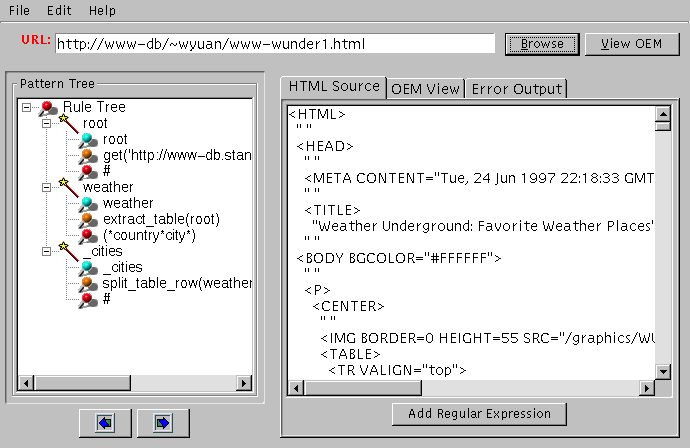
Currently, the GUI only supports the Web Extractor script (proxygen.py).
In the future, we intend to extend it to include features of the Web Crawler
as well.
Questions/Comments? Please contact Ka
Fai Yau <kyau@db.stanford.edu>.